Work naturally in the Windows Terminal CLI. TraceTerm preserves commands, outputs and device context as an Operational Trace, then turns that evidence into topology, documentation, handoffs and troubleshooting plans.
Windows Terminal CLICanonical Operational TraceBYOK AI derivations
TraceTerm
Search device, IP, circuit...Ctrl K
SITE-A-P-OHX-2132NOKIA - - - -
CredentialSSH
TraceTerm local shell

$ tt sessions list
ACTIVE   PROVISIONING-MCO31596   5 tabs   20 events
PAUSED   TROUBLESHOOTING-EDGE    2 tabs   11 events

$ tt connect SITE-A-P-OHX-2132
Opening SSH session with linked Work Session...
Total MVPN-IPv4 Rem Rts : 0          Total MVPN-IPv4 Rem Act Rts : 0
Total MVPN-IPv6 Rem Rts : 0          Total MVPN-IPv6 Rem Act Rts : 0
Total MDT-SAFI Rem Rts : 0           Total MDT-SAFI Rem Act Rts : 0
Total McIPv4 Remote Rts : 0          Total McIPv4 Rem. Active Rts : 0
Total McVpnIPv6 Remote Rts : 0       Total McVpnIPv6 Rem. Active Rts : 0

==============================================================
BGP Summary
==============================================================
Legend : D - Dynamic Neighbor
==============================================================
Neighbor        AS PktRcvd InQ  Up/Down    State|Rcv/Act/Sent
177.12.224.101  61568      0    62d21h48m  Idle (Shutdown)
177.12.224.102  61568      0    62d21h48m  Idle (Shutdown)
177.12.224.103  61568      0    60d05h53m  Idle (Shutdown)
177.12.224.104  61568      0    62d21h15m  Idle (Shutdown)
177.12.224.105  61568      0    62d21h48m  Idle (Shutdown)
==============================================================
A:NOKIA.IXR.TSQ.MCO.AL# show version
TiMOS-C-20.10.R6 cpm/x86hops64 Nokia 7250 IXR Copyright (c) 2000-2021 Nokia.
All rights reserved. All use subject to applicable license agreements.
Built on Sun Aug 15 09:20:02 PDT 2021 by builder in /builds/c/2010B/R6/panos/main/sros
A:NOKIA.IXR.TSQ.MCO.AL# show system|
SITE-R-PE-OHX-2155# show interface terse
Interface              Admin Link  Description
ge-0/0/0               up    up    core transport
ge-0/0/1               up    up    customer handoff
ae12                   up    up    metro aggregation

SITE-R-PE-OHX-2155# show configuration interfaces ge-0/0/1
description "customer handoff";
unit 0 {
  family ethernet-switching {
    vlan members 1842;
  }
}

SITE-R-PE-OHX-2155# |
28/08/2026 18:12:53 - SITE-A-P-OHX-2132 (10.7.9.114) - show version
4 output lines - 272 bytes
TiMOS-C-20.10.R6 cpm/x86hops64 Nokia 7250 IXR Copyright (c) 2000-2021 Nokia.
All rights reserved. All use subject to applicable license agreements.
Built on Sun Aug 15 09:20:02 PDT 2021 by builder in /builds/c/2010B/R6/panos/main/sros
A:NOKIA.IXR.TSQ.MCO.AL# show system
28/08/2026 18:12:31 - SITE-A-P-OHX-2132 (10.7.9.114) - show router bgp summary
61 output lines - 3924 bytes - warning
BGP Router ID:10.7.9.114      AS:61568      Local AS:61568
==============================================================
BGP Admin State       : Up        BGP Oper State       : Up
Total Peer Groups     : 1         Total Peers          : 5
Total BGP Paths       : 295       Total Path Memory    : 107488

Total IPv4 Remote Rts : 0         Total IPv4 Rem. Active Rts : 0
Total IPv6 Remote Rts : 0         Total IPv6 Rem. Active Rts : 0
Total VPN-IPv4 Rem. Rts : 0       Total VPN-IPv4 Rem. Act. Rts : 0
Work Sessions
Operational work registry
Search reference, customer, circuit or title
StatusTypeReferenceCustomerDate
ActiveProvisioningPROVISIONING-MCO31596SED Example25 de ago.
ActiveTroubleshootingTROUBLESHOOTING-EDGE-4821Metro POP North29 de ago.
PausedProvisioningPROVISIONING-FTTH-7742Access Expansion28 de ago.
DoneChangeCHANGE-BGP-RR-1930Backbone Core28 de ago.
DoneAuditAUDIT-ACL-CORE-6027Security Review27 de ago.
ActiveTroubleshootingTROUBLESHOOTING-L2-RING-5408South Metro27 de ago.
PausedChangeCHANGE-VLAN-3116Enterprise WAN26 de ago.
DoneMaintenanceMAINTENANCE-MPLS-8801Core Transport25 de ago.
ArchiveReviewREVIEW-QOS-4475Wholesale Links24 de ago.
DoneProvisioningPROVISIONING-CPE-7094Branch Rollout23 de ago.
ActiveTroubleshootingTROUBLESHOOTING-ISIS-2238Backbone Ring22 de ago.
DoneMaintenanceMAINTENANCE-SROS-9182Nokia Edge21 de ago.
ArchiveReviewREVIEW-NOC-1364Night Shift20 de ago.
DoneAuditAUDIT-OPTICS-6720DWDM Span19 de ago.
PausedAuditAUDIT-UPLINK-5502Regional Aggregation18 de ago.
SITE-A-P-OHX-2132NOKIASSHBGP -ISIS not connectedSession 00:18:42
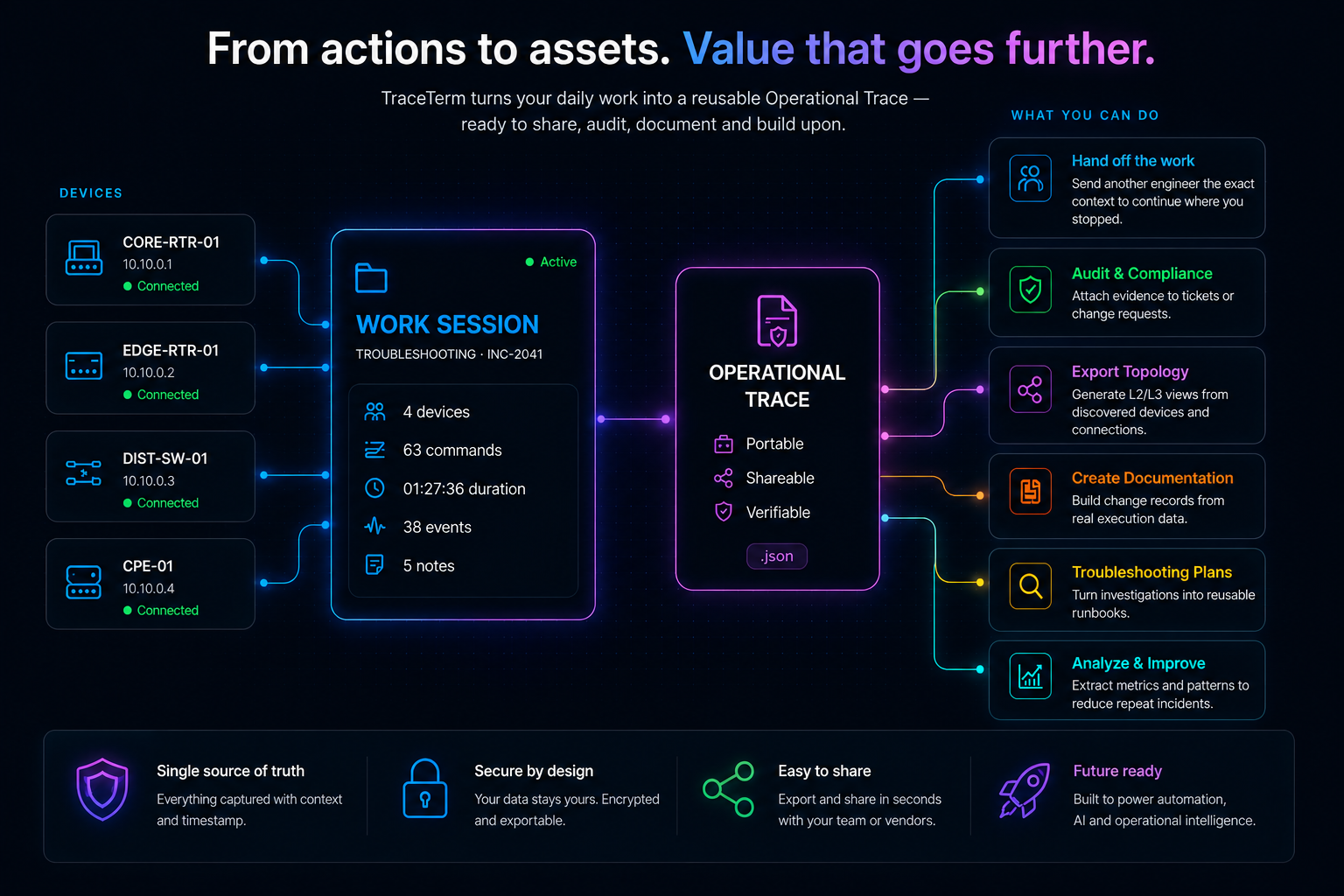
From actions to assets
Capture the work once. Derive what the operation needs next.
During a Work Session, TraceTerm preserves device context, commands, complete outputs, notes and timestamps. The resulting Operational Trace is the canonical source for topology, documentation, handoffs and troubleshooting plans.
One Work Session. One canonical trace. Multiple reliable artifacts.
Capture once. Use many times. Share where it matters.
Troubleshooting - INC-2041Active
OverviewDevices (4)CommandsNotes (5)Events (38)
Connected to CORE-RTR-01SSH
show ip bgp summary3 neighbors, 3 establishedCORE-RTR-01
Connected to EDGE-RTR-01SSH
show interfaces GigabitEthernet0/1Line protocol is upEDGE-RTR-01
ping 10.20.1.10 source Loopback05/5 replies, 2 ms avgEDGE-RTR-01
Added investigation noteIntermittent latency observed on uplinkNote
4 devices63 commands38 events01:27:36 duration
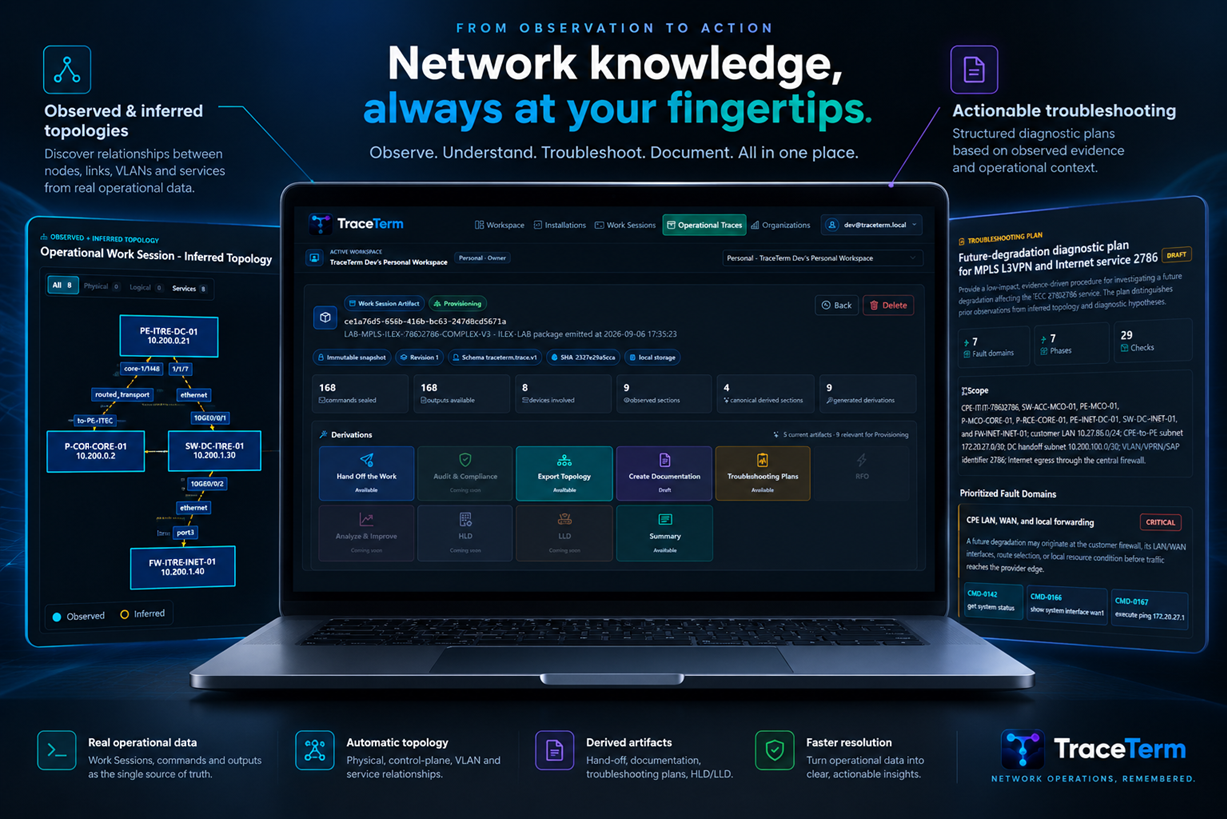
The Operational Trace: a canonical source for derived work
Each emitted revision is preserved as structured JSON with integrity metadata. The Portal reads that exact evidence instead of asking engineers to recreate context after the activity.
Canonical JSONPortable, versioned and integrity-checked.
Evidence chainUsers, devices, commands, complete outputs and timestamps stay connected.
Artifact sourceGenerate human-readable outputs without mutating the original trace.
BYOK AIUse your own provider key when inference is required.
Derivations use the exact canonical Trace revision and remain linked to their source. Availability follows the Work Session type, and AI-assisted outputs use the customer's own provider key.
All Work Session types
Summary
A concise factual view of scope, devices, commands, observations and evidence.
Deterministic
All Work Session types
Work Handoff
Transfer captured state, recent execution, risks and proposed next actions.
Markdown + PDF
Provisioning evidence
Inferred Topology
Build physical, logical, service and general views from observed and inferred relationships.
BYOK AI
Provisioning + topology
Provisioning Documentation
Combine topology, device relationships and timestamped commands into an editable document.
DOCX + PDF
Provisioning + topology
Troubleshooting Plans
Create a phased diagnostic plan for the exact service and configuration that were implemented.
BYOK AI + PDF
One product, three responsibilities
The Terminal operates. The Backend preserves. The Portal derives.
01
Windows Terminal CLI
Connects to customer devices over SSH or Telnet and captures the Work Session while the engineer works.
Reviews evidence, manages Organizations and produces human-readable derived artifacts.
The problem with traditional terminals
Your terminal should not forget everything when the session closes.
Traditional SSH clients connect engineers to devices. TraceTerm understands and preserves the operational work happening across those connections.
Troubleshooting starts from scratch
TraceTerm keeps the command sequence, device context and outputs that led to the fix.
Provisioning documentation takes too long
Work Sessions group the devices, commands and evidence behind a real activity.
Context is scattered across tools
Notes, terminal tabs and outputs stay tied to the same operational record.
Handoffs repeat the investigation
Leaders can review what happened without asking engineers to reconstruct the work.
Product differentiation
Work Sessions turn terminal activity into operational memory.
A Work Session groups devices, terminal sessions, commands, outputs and operational context around a real activity such as provisioning or troubleshooting.
The engineer works normally. TraceTerm remembers the rest.
ActiveProvisioningPROVISIONING-MCO31596SED Example25 de ago.
ActiveTroubleshootingTROUBLESHOOTING-EDGE-4821Metro POP North29 de ago.
PausedProvisioningPROVISIONING-FTTH-7742Access Expansion28 de ago.
DoneChangeCHANGE-BGP-RR-1930Backbone Core28 de ago.
DoneAuditAUDIT-ACL-CORE-6027Security Review27 de ago.
ActiveTroubleshootingTROUBLESHOOTING-L2-RING-5408South Metro27 de ago.
PausedChangeCHANGE-VLAN-3116Enterprise WAN26 de ago.
DoneMaintenanceMAINTENANCE-MPLS-8801Core Transport25 de ago.
ArchiveReviewREVIEW-QOS-4475Wholesale Links24 de ago.
DoneProvisioningPROVISIONING-CPE-7094Branch Rollout23 de ago.
ActiveTroubleshootingTROUBLESHOOTING-ISIS-2238Backbone Ring22 de ago.
DoneMaintenanceMAINTENANCE-SROS-9182Nokia Edge21 de ago.
ArchiveReviewREVIEW-NOC-1364Night Shift20 de ago.
DoneAuditAUDIT-OPTICS-6720DWDM Span19 de ago.
PausedAuditAUDIT-UPLINK-5502Regional Aggregation18 de ago.
Built for network operations teams
Useful for the engineer, visible to the leader, accountable for the company.
Network Engineer
Work with less operational drag
Open multiple device sessions, keep command history automatically and stop rebuilding context from notes and chat messages.
Team Leader
Keep knowledge inside the team
Review Work Sessions, timelines and evidence so provisioning and troubleshooting knowledge does not disappear between engineers.
Company
Know what changed in the network
Build practical visibility over network operations without inventing fake reports after the work is already done.
Pricing
Plans that work for individual engineers, teams, and network operations organizations.
Choose Personal or Team here, then select monthly or annual billing in the Portal. Personal belongs to one engineer; Team is a separate subscription paid centrally by its Owner.
7 days free. No credit card required. Creating a Team uses the Owner's current trial window; it does not start another 7 days.
Most popular
Personal
Personal
$12Per user, per month $120 yearly · 2 months free
For individual engineers who want TraceTerm as the daily workspace for provisioning and troubleshooting.
Yes. Personal and Team are independent subscriptions. Creating or subscribing a Team does not cancel, convert, or include the Owner's Personal subscription.
Who pays for Team members?
The Team Owner pays centrally. The Owner is the first seat, pending invitations are free, and each accepted membership adds one paid seat. Invited members do not provide a card for Team access.
What happens after the 7-day trial?
An active subscription and payment method are required to create, synchronize, or export operational data. Existing evidence remains retained and can be opened through the Portal's restricted read-only mode.
Features that support conversion
Productivity in the terminal. Traceability in the operation.
Productivity layer
Quick Connect
Open network devices fast by hostname or management IP.
SSH / Telnet
Work with modern infrastructure and legacy equipment still present in real networks.
Multi-session
Switch between devices without losing where you were.
Credentials
Reduce repeated prompts and keep access context organized.
Operational memory layer
Work Sessions
Group real operational activity across devices, commands, outputs and evidence.
Operational Traces
Preserve complete, versioned evidence as an integrity-checked canonical JSON revision.
Derived artifacts
Generate summaries, handoffs, topology, documentation and troubleshooting plans from captured facts.
BYOK AI
Use your own AI provider credential for inference while TraceTerm records model and prompt provenance.
Before and after
From disposable terminal work to searchable operational history.
Before TraceTerm
Context scattered everywhere
Commands lost after the session closes
Outputs copied into notes manually
Evidence spread across screenshots and chats
Knowledge stays in people's heads
With TraceTerm
Work becomes traceable
Centralized historyEvidence by activityDevice contextOperational timelineHandoff-ready recordsAuditable changes
Less rework for engineers. Better visibility for the operation.
Use cases
Designed for daily NOC, ISP, telecom and infrastructure work.
Network troubleshooting
Preserve hypotheses, commands, outputs and evidence during investigation.
Network provisioning
Track the devices and commands involved in bringing a service online.
Planned change
Keep a clear record of what happened during the change window.
Post-incident review
Rebuild the operational sequence without depending on memory.
Operational audit
Review sessions, devices, commands and outputs by activity.
Trust boundaries
Network access stays with the engineer. Evidence moves by authorization.
Local network operation
The Windows Terminal CLI connects to devices; the Portal never initiates SSH or Telnet access.
Authorized synchronization
Each Terminal CLI installation is browser-authorized to a specific Workspace before synchronized evidence is accepted.
Customer-controlled AI
AI-assisted derivations use a provider credential supplied by the customer and preserve generation provenance.
Terminal CLI availability
Take TraceTerm into the network with the Windows Terminal CLI.
Install the operational client, authorize it from your Portal account, and choose the Workspace that will receive synchronized Work Sessions and Operational Traces.
Available for Windows x64
Windows Terminal CLI
The operational client for SSH/Telnet access, Work Session tracking and authorized synchronization.
Unsigned release: Authenticode is being added in parallel. Windows may show an unknown-publisher or SmartScreen warning. Verify the HTTPS address and SHA-256 above; do not disable Windows security controls.
After installation, sign in to the Portal and authorize the Terminal CLI to the Workspace where its synchronized work should be stored.
TraceTerm Portal
Review the evidence. Derive the artifact. Keep the operation moving.
Select your plan, sign in, and confirm the Workspace where your operational work will live.